Novation updates Automap to v3.7.4
Novation has updated Automap
to version 3.7.4.

Important:
-
The Waves 8 features are not fully implemented, Waves 8 users are not
advised to install this beta.
-
Logic users who previously used 'Automap Logic Mixer' should go to Logic
> Preferences > Control Surfaces > Rebuild Defaults, to update
Logic's mixer settings.
Changes:
-
Fixed crash with Plug-In Manager under certain conditions.
-
Fixed drumpad calibration issue with Nocturn Keyboard.
-
Updated firmware for Remote SL Compact to version 4.2.03.
-
Added partial native support for Waves 8 plug-ins (not fully
implemented).
-
Added notification when trying to wrap Waves 8 plug-ins in Plug-In
Manager.
-
Fixed some Waves VST3 mono plug-ins not able to be automapped.
-
Added and improved some default mappings.
-
Added 64 bit plug-in display in Plug-In Manager for Windows 7 64
systems.
-
Updated VST3 search paths on Windows 7 64 system in Plug-In Manager.
-
Updated Windows Novation USB Driver to 2.1 release version.
-
Fixed Digital Performer 7 crash on some systems.
-
Improved VST3 wrapper using the latest VST3 SDK.
Remote SL Compact 4.2.03 release notes:
Automap
3 is the latest
incarnation of Novation's intelligent software system. Automap is unique to
Novation's MIDI controllers, and has now been enhanced with a wealth of
eagerly anticipated features. Until now Automap had focused on plug-in
control, but exciting developments bring a new level of DAW control.
No
matter what music software you use, Automap offers an instant controlling
solution for all your plug-ins. It supports VST, AU and Pro Tools (TDM/RTAS)
plug-in formats (TDM/RTAS support is currently Mac only. PC will follow soon).
It allows hardware controllers to interact with plug-in instruments and
effects. Opening up any Automappable plug-in instantly maps parameters to
physical controls on Novation's SL- and Nocturn controllers. These can be
re-assigned using an ultra-quick 'learn' mode, which simply involves clicking
the on-screen parameter and touching the desired hardware controller. In
addition to DAW control templates on board the SL range (mixer, transport etc)
Automap 3 comes with full HUI implementation for control of HUI compatible
DAWs such Logic, Pro Tools and Digital Performer.
Automap
Features:
-
Automatic
plug-in mapping: All automatable VST, AU or Pro Tools format
plug-ins need just be opened in any DAW for instant control.
-
Heads-up
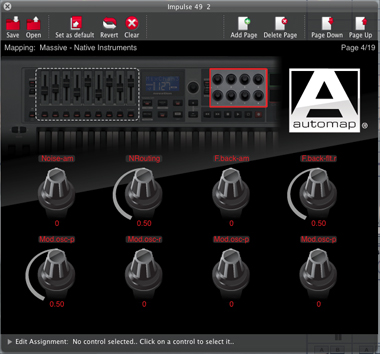
transparent GUI: Automap provides a transparent control map
across your computer screen, so you can see at a glance how every
parameter is assigned.
-
Learn
and Clear modes: Make and delete assignments directly from your
computer screen using lightning-fast click and touch facilities.
-
Automatic
Mixer control: A growing number of supported DAWs allow
comprehensive control of the mixer via the Automap software (Non-supported
DAWs can be controlled using separate dedicated Automap systems).
-
Plug-in
and Mixer map browsing facility: Get to the right software fast.
Control maps are automatically placed into categories depending on type
(instrument, mixer etc.) for quick and easy browsing and selection with
hardware or software.
-
MIDI
integration: 16 standard MIDI control maps (totaling 2048
separate controls) can be created to be used alongside plug-in and mixer
maps - ideal for software with a MIDI learn facility.
Automap
3 is available in two forms, Automap 3 Standard and Automap
3 PRO. Automap 3 Standard is a free download and Automap 3 PRO (which
has extra features listed below) is available to download for £19.99.
Automap
3 Pro has the following benefits over Automap 3 Standard:
-
Multiple
device support: Automap 3 Pro supports multiple devices, so
numerous Novation controllers can be used side by side.
-
Keystroke
Assignments: Automap 3 Pro can assign almost any computer
keyboard shortcuts to hardware controls. For example arrow key functions
can now be assigned to hardware controls, allowing you to flick between
tracks using buttons on your SL/Nocturn. You could also zoom in and out,
open windows or create and jump to markers in your DAW.
-
Drag
and Drop: With 'PRO' you can drag and drop control mappings and
control map groups in the GUI, allowing you to re-assign knobs, faders and
buttons by simply grabbing them with the mouse and dropping them on the
new controller.
-
XY
Pad Control: Fully Auto-mappable XY Pad control, expression
pedal, control pedal and drum pad control. The Automap server can now
assign parameters to all these controllers using the ultra-quick learn
facility.
-
Autoview
Mode: Optional Autoview mode means that the GUI only becomes
visible when a controller is touched, then it disappears again allowing
you to get back to your DAW.
Related
Software Hosts
News
|