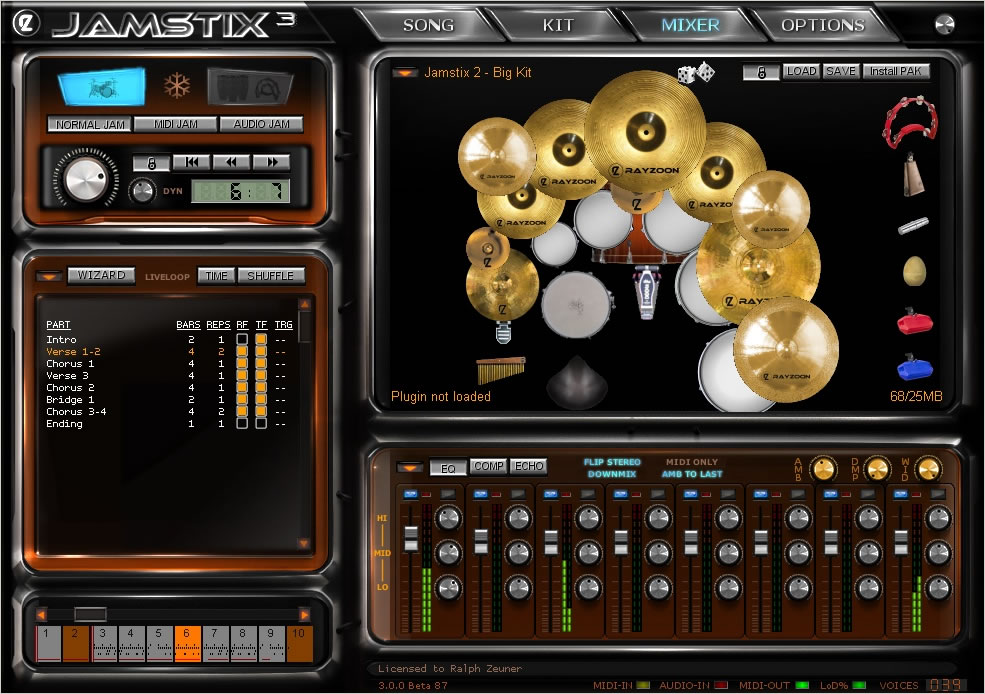
::: Rayzoon has released version 3.2.0 of its virtual drummer Jamstix. This update offers various enhancements and fixes and is available now to all Jamstix 3 owners at no charge. The demo version has also been updated.   Changes: While in preview loop, the current bar can now be changed via clicking on the bar timeline. Added 'End Crash' sound selection option to fill generator and global action menu. Added 'Send Whole Kit To MIDI Channel' function to kit menu. Sound selection menus now also show related kit piece name. Added options to 'Global Actions' in song menu to enable/disable start crash and end crash options for fills. Added velocity offset for Jamcussion. Hold ALT while in JC mode and the song power knob will show and adjust this offset. Turn left to reduce JC power and vice versa. Added 'Position-Based Dampening' to kit menu, saved to project. AUTO and BAR settings now save globally. Added 'List Brain Elements' to brain menu. Groove brain elements can now be moved (left-click header). Added missing value display for several brain controls. Added list of installed expansions to ABOUT screen (click on JAMSTIX header). Added ini file option 'LargeTuningRange'. If set to 1, kit editor tuning will be +/- 80% versus the default 20%. Velocity line color in the bar editor can now be changed in ini file as BGR value (i.e BEVeloColor=$00FF00 is green). Locked note color in the bar editor can now be changed in ini file as BGR value (i.e BELockedColor=$FF0000 is blue). Fixed copy/paste of multiple parts. Fixed problem with spaces when renaming Jamstix classic controls. Fixed fill settings resetting when adding groove or accent brain elements. Fixed GUI confusion when re-opening JS in Jamcussion mode with GUI caching disabled. Fixed mixer being bypassed when 'Never Downmix' is enabled. Fixed 'Behavior' and 'Alternating' not updating in GUI when changed via MIDI controller. Fixed groove weights resetting when reloading non 4/4-projects. Fixed problem in the 'Freestyle' hihat opening element. Fixed problem when loading liveloop songs. Fixed 'Turn Groove Into Style' not working with groove-changing players. Fixed 'Auto Snare' not working with 'Jamstix Classic' style. Fixed static tom usage in "Tom Groove" element. Fixed graphic overlap in Jamstix Classic brain controls for non-4/4 meters. Fixed error when changing hihat sound. Fixed problem with excessive snare notes with certain styles. Fixed groove functions of player models creating notes in intro parts. Locked notes are no longer suppressed by blocking functions such as 'Early Downbeat'.     Jamstix is virtual drum software which simulates a drummer inside of your sequencer/host. Unlike most other drum modules, which either provide static MIDI patterns or an engine that combines pre-recorded MIDI patterns, Jamstix features a realtime simulation of a human drummer down to the calculation of the time it takes a drummer to move an arm from drum A to drum B. This means that arrangements created with Jamstix are always humanly playable (no ten-armed drummers) and also always unique and varied since they are created based on rules and not static patterns. When Jamstix 1 was released in March of 2005, it was quickly praised for its new and innovative approach using rule-based groove intelligence. Jamstix 3 takes this approach to new heights with an improved interface, more styles and drummers and countless new features and enhancements. The new "song builder" function can create a full drum arrangement with many parts and fills in seconds and brand-new stock kits offer incredible realistic sound reproduction. Whether you are a hobbyist or a professional, whether you are in need of a jamming partner or a drum arrangement tool, a student wanting to learn more about drumming style or a songwriter needing to create a complex and unique drum track quickly, whether you have no drum module at all or have every high-end drum library on the market and wish to get the most realistic grooves out of them, Jamstix 3 could be for you. Advanced Virtual Drummer: Real-time groove composition using dedicated style and drummer modeling (not static patterns). In-depth drummer limb simulation, including triangulation of hand movements, ensures that the grooves are always humanly playable (no ten-armed drummer here). Advanced feel modeling includes sound-specific pocket delays, power and timing variations and can play ahead, on or behind the beat. Real-time fill generator produces unique fills (no static patterns used) that match the style and drummer in use. Streamlined interface with visual drum kit for editing as well as just watching the drums play. Part-based arranger with transition and repetition fills, liveloop technology as well as drag-&-drop MIDI export. Limb-centric bar editor allows fine-tuning of notes without need for MIDI export/editing in host. Extensive MIDI controller mapping allows in-depth remote-control of the style, drummer and mixer. Comes with over 60 styles (rock, funk, afro-cuban, blues, jazz, electronica, brazilian, breakbeat, country, R&B, Motown and many more) and 15 human drummer models, expandable via future Paks. High Quality Sounds: Built-in high-quality drum sample player with multiple velocity layers and controllable ambience. Built-in mixer with FX. Route sounds to up to 17 stereo outputs. Extensive sound library that can be expanded via expansion Paks. Integrates With Other Sound Modules: Integrated VSTi sub-hosting allows usage of any VSTi drum synthesizer, such as BFD2, Superior 2, EZDrummer and Addictive Drums. Combine the sounds of your favorite drum plugin with the jam power and realism of Jamstix. Allows creating kits that use a mix of external sounds and Jamstix sounds. For example, you can built a kit that uses EZDrummer drums and Jamstix percussion sounds and cymbals. Flexible key and velocity mapping. Interactive Jamming Jamstix can interact with your MIDI or audio input by adjusting velocity and using play rules, such as hihat/ride switching and snare head/sidestick switching as well as rhythm reduction giving you the feel of playing with a human drummer. E-Drum Support Jamstix can be used with any e-drum kit and fully supports the TD-20 V-Drums, including bow/shank hihat, foot splashing, aftertouch cymbal choking and snare position sensing. Supports Your Existing MIDI grooves Jamstix can import your existing MIDI drum grooves as well as Jamstix 1 rhythms and use them as styles for playing by the drummer models. This means a static 1-bar MID file groove comes to live by being played with the feel, accents and fills of the Jamstix virtual drummers. XL Version - Jazz, Electronic Grooves And More. Jamstix comes with jazz styles as well as an electronica style, which together with the brushed kit and electronic kits of the XL version, allow Jamstix to cover a huge range of genres. Specifications: VSTi 2.4 Plugin. MIDI input/MIDI output. 4-17 stereo audio outputs. Song arranger with unlimited parts, synched to host song position, tempo and time signature. High-quality drum sample player with controllable ambience, supports existing Jamstix 1, 2 kits and expansion Paks. VSTi subhost for integration of 3rd party drum plugins. Built-in mixer with 3-band EQ, compressor and delay effect. Virtual drummer capable of producing realistic drum performances from scratch (not using preset MIDI patterns) with in-depth style and drummer modeling, groove processing, advanced limb control and a flexible fill generator. Limb-centric step sequencer allows manual adjustment of generated grooves and fills or creating them from scratch as well as importing existing MIDI patterns, MIDI fills and Jamstix 1,2 patterns and fills. Extensive MIDI controller mapping. Supported sample rates: 44.1-96kHz. Copy protection: license key. free, download, no torrent, warez, crack, keygen, serial, MediaFire, HotFile, FileJungle, RapidShare, FileSonic, Wupload, FileServe, blogspot ;

Menu

»

Home

Rayzoon Technologies Jamstix v3.2


Rayzoon has released version 3.2.0 of its virtual drummer Jamstix. This update offers various enhancements and fixes and is available now to all Jamstix 3 owners at no charge. The demo version has also been updated.


Changes:

  • While in preview loop, the current bar can now be changed via clicking on the bar timeline.

  • Added 'End Crash' sound selection option to fill generator and global action menu.

  • Added 'Send Whole Kit To MIDI Channel' function to kit menu.

  • Sound selection menus now also show related kit piece name.

  • Added options to 'Global Actions' in song menu to enable/disable start crash and end crash options for fills.

  • Added velocity offset for Jamcussion. Hold ALT while in JC mode and the song power knob will show and adjust this offset. Turn left to reduce JC power and vice versa.

  • Added 'Position-Based Dampening' to kit menu, saved to project.

  • AUTO and BAR settings now save globally.

  • Added 'List Brain Elements' to brain menu.

  • Groove brain elements can now be moved (left-click header).

  • Added missing value display for several brain controls.

  • Added list of installed expansions to ABOUT screen (click on JAMSTIX header).

  • Added ini file option 'LargeTuningRange'. If set to 1, kit editor tuning will be +/- 80% versus the default 20%.

  • Velocity line color in the bar editor can now be changed in ini file as BGR value (i.e BEVeloColor=$00FF00 is green).

  • Locked note color in the bar editor can now be changed in ini file as BGR value (i.e BELockedColor=$FF0000 is blue).

  • Fixed copy/paste of multiple parts.

  • Fixed problem with spaces when renaming Jamstix classic controls.

  • Fixed fill settings resetting when adding groove or accent brain elements.

  • Fixed GUI confusion when re-opening JS in Jamcussion mode with GUI caching disabled.

  • Fixed mixer being bypassed when 'Never Downmix' is enabled.

  • Fixed 'Behavior' and 'Alternating' not updating in GUI when changed via MIDI controller.

  • Fixed groove weights resetting when reloading non 4/4-projects.

  • Fixed problem in the 'Freestyle' hihat opening element.

  • Fixed problem when loading liveloop songs.

  • Fixed 'Turn Groove Into Style' not working with groove-changing players.

  • Fixed 'Auto Snare' not working with 'Jamstix Classic' style.

  • Fixed static tom usage in "Tom Groove" element.

  • Fixed graphic overlap in Jamstix Classic brain controls for non-4/4 meters.

  • Fixed error when changing hihat sound.

  • Fixed problem with excessive snare notes with certain styles.

  • Fixed groove functions of player models creating notes in intro parts.

  • Locked notes are no longer suppressed by blocking functions such as 'Early Downbeat'.



The Event List view shows events in a list format. You can insert, delete, or modify any kind of event, including notes, pitch-wheel data, velocity, MIDI controllers, patch changes, Wave files, lyrics, text strings, MCI commands, System Exclusive meta-events, and more. There are three ways to open the Event List view:  Select one or more tracks and choose View-Event List -- Select one or more tracks and click  in the Views toolbar  -- Right-click a clip in the Clips pane and choose View-Event List from the popup menu  -- The events in the selected tracks are listed one per line, from top to bottom. As you move the highlight through the event list, SONAR updates the Now marker (time display). During playback, the event list scrolls to display the events at the current time. The current event is centered in the Event List during playback, and the highlight is on the correct event when playback stops. Any time you change the Now time, the event list is updated and the highlight is moved to the event that will be played next.  When the Event List view includes more than one track, events are mixed together in chronological order. For example, if you select tracks 1 and 3 when you open the Event List view, you see a single list of intermingled events from tracks 1 and 3. You can have any number of Event List views, each containing any number of tracks, open at the same time. You can change the tracks shown in the Event List view by clicking the  button and choosing the tracks you want.

VST is a trademark of Steinberg Soft- und Hardware GmbH


 Syntheway Virtual Musical Instruments © 2004-2012 Daniel Alberto Laiseca| Buenos Aires - Argentina|

Privacy Policy | Disclaimer | FAQ | Site Map Artists & Links Technical Support ContactAbout Us