::: .::. Numerology is a modular music-sequencing and audio plug-in environment for Mac OS X. It takes the step sequencing and modulation metaphors established by the analog sequencers of the 70s, and implements them in a structured and highly interactive software environment designed for experimentation, improvisation and live performance. .::. Features coming after the 1.0 release Bitwig Studio's base technologies already support the following features, which will be released in a later version. LAN multi-user jamming: Multiple users can jam on the same document, and everything can be captured in the document's arrangement. Multi-user music production over the Internet: Multiple users can compose music on the same document from different locations. Bitwig Studio keeps everything in sync. Native modular system: Create your own instruments and effects or modify existing ones. Design their appearance and share them with the world. free, download, no torrent, warez, crack, keygen, serial, MediaFire, HotFile, FileJungle, RapidShare, FileSonic, Wupload, FileServe, blogspot ;

Menu

»

Home

Bitwig Studio


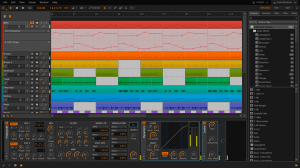
Bitwig have finally announced their upcoming product, Bitwig Studio, described as "the next-generation music-creation software, developed and built by passionate musicians wanting a more natural way to create music and sound".

Bitwig Studio is a multi-platform music-creation system for production, performance and DJing, with a focus on flexible editing tools and a super-fast workflow.

Features in v1.0:

  • Multitrack recording: Record and produce your music in a super-fast, intuitive workflow. Bitwig Studio's arranger is a perfect mix of editing power, ease of use and flexibility.

  • Arranger clip launcher: A non-linear environment that lets you trigger clips in real-time. Perfect for sketching your songs more spontaneously.

  • Mixer clip launcher: An alternative view of the clip launcher aligned with the mixer, optimized for live performance and DJing.

  • Generic tracks: Tracks accept any kind of material. Audio and notes can live on the same track. You can bounce note clips to audio in place.

  • Clip automation: In addition to traditional track automation, automation can also be recorded and packaged inside clips, both on the clip launcher and the arranger.

  • Per-note automation: Pitch variations can be applied to individual notes directly in the piano roll. You can also edit a note's panning, timbre and volume curves.

  • Simultaneous multitrack editing: Edit contents of multiple tracks together. You can see them all juxtaposed and isolate only the ones you want to edit.

  • Multiple audio events per clip: An audio clip can contain multiple audio events. You can chop and edit audio files inside a clip non-destructively and loop it all as a package.

  • Real-time time stretching: Bitwig Studio's proprietary technology lets you match any audio material to the document tempo and get everything in sync.

  • World-class sound devices: Let's put it this way: You're gonna love these instruments and effects. Get great sounds in a matter of seconds.

  • Device nesting: Devices can contain other devices, and the whole package can be saved as a preset. Many of our instruments and effects use nesting in new and powerful ways.

  • 32/64 bit VST support: Use your beloved VST plug-ins. In case of a plug-in crash, a protective mechanism prevents the application from crashing and you from losing your work.

  • Metadata-based browser: Find your musical material quickly. Add tags and search by content type.

  • Open multiple documents: Exchange musical material between documents. Drag and drop, copy and paste back and forth.

  • Multi-monitor support: Bitwig Studio offers flexible screensets to take full advantage of your monitor configuration.

  • Slick user interface: Bitwig Studio's user interface has been meticulously crafted to make your music creation experience fun and intuitive.

Features coming after the 1.0 release
Bitwig Studio's base technologies already support the following features, which will be released in a later version.

  • LAN multi-user jamming: Multiple users can jam on the same document, and everything can be captured in the document's arrangement.

  • Multi-user music production over the Internet: Multiple users can compose music on the same document from different locations. Bitwig Studio keeps everything in sync.

  • Native modular system: Create your own instruments and effects or modify existing ones. Design their appearance and share them with the world.

Pricing & Availability

Pricing and release date will be announced later.


Bitwig Studio is a multi-platform music-creation system for production, performance and DJing, with a focus on flexible editing tools and a super-fast workflow.

Features in v1.0:

  • Multitrack recording: Record and produce your music in a super-fast, intuitive workflow. Bitwig Studio's arranger is a perfect mix of editing power, ease of use and flexibility.

  • Arranger clip launcher: A non-linear environment that lets you trigger clips in real-time. Perfect for sketching your songs more spontaneously.

  • Mixer clip launcher: An alternative view of the clip launcher aligned with the mixer, optimized for live performance and DJing.

  • Generic tracks: Tracks accept any kind of material. Audio and notes can live on the same track. You can bounce note clips to audio in place.

  • Clip automation: In addition to traditional track automation, automation can also be recorded and packaged inside clips, both on the clip launcher and the arranger.

  • Per-note automation: Pitch variations can be applied to individual notes directly in the piano roll. You can also edit a note's panning, timbre and volume curves.

  • Simultaneous multitrack editing: Edit contents of multiple tracks together. You can see them all juxtaposed and isolate only the ones you want to edit.

  • Multiple audio events per clip: An audio clip can contain multiple audio events. You can chop and edit audio files inside a clip non-destructively and loop it all as a package.

  • Real-time time stretching: Bitwig Studio's proprietary technology lets you match any audio material to the document tempo and get everything in sync.

  • World-class sound devices: Let's put it this way: You're gonna love these instruments and effects. Get great sounds in a matter of seconds.

  • Device nesting: Devices can contain other devices, and the whole package can be saved as a preset. Many of our instruments and effects use nesting in new and powerful ways.

  • 32/64 bit VST support: Use your beloved VST plug-ins. In case of a plug-in crash, a protective mechanism prevents the application from crashing and you from losing your work.

  • Metadata-based browser: Find your musical material quickly. Add tags and search by content type.

  • Open multiple documents: Exchange musical material between documents. Drag and drop, copy and paste back and forth.

  • Multi-monitor support: Bitwig Studio offers flexible screensets to take full advantage of your monitor configuration.

  • Slick user interface: Bitwig Studio's user interface has been meticulously crafted to make your music creation experience fun and intuitive.

Features coming after the 1.0 release
Bitwig Studio's base technologies already support the following features, which will be released in a later version.

  • LAN multi-user jamming: Multiple users can jam on the same document, and everything can be captured in the document's arrangement.

  • Multi-user music production over the Internet: Multiple users can compose music on the same document from different locations. Bitwig Studio keeps everything in sync.

  • Native modular system: Create your own instruments and effects or modify existing ones. Design their appearance and share them with the world.


The Event List view shows events in a list format. You can insert, delete, or modify any kind of event, including notes, pitch-wheel data, velocity, MIDI controllers, patch changes, Wave files, lyrics, text strings, MCI commands, System Exclusive meta-events, and more. There are three ways to open the Event List view:  Select one or more tracks and choose View-Event List -- Select one or more tracks and click  in the Views toolbar  -- Right-click a clip in the Clips pane and choose View-Event List from the popup menu  -- The events in the selected tracks are listed one per line, from top to bottom. As you move the highlight through the event list, SONAR updates the Now marker (time display). During playback, the event list scrolls to display the events at the current time. The current event is centered in the Event List during playback, and the highlight is on the correct event when playback stops. Any time you change the Now time, the event list is updated and the highlight is moved to the event that will be played next.  When the Event List view includes more than one track, events are mixed together in chronological order. For example, if you select tracks 1 and 3 when you open the Event List view, you see a single list of intermingled events from tracks 1 and 3. You can have any number of Event List views, each containing any number of tracks, open at the same time. You can change the tracks shown in the Event List view by clicking the  button and choosing the tracks you want.

VST is a trademark of Steinberg Soft- und Hardware GmbH


 Syntheway Virtual Musical Instruments © 2004-2012 Daniel Alberto Laiseca| Buenos Aires - Argentina|

Privacy Policy | Disclaimer | FAQ | Site Map Artists & Links Technical Support ContactAbout Us