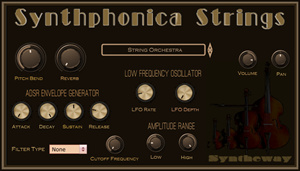
Virtual Cello VST: Path and Life Burns! (Apocalyptica) Synthphonica Strings VST VST3 Audio Unit: Lead, Bass and Rhythm Virtual Cellos Emulation. Also available in EXS24 and KONTAKT Sample Libraries
Life Burns!
(Apocalyptica cover*) Synthphonica
Strings VST VST3 Audio Unit EX24
and KONTAKT: Lead, Bass and
Rhythm Cellos Emulation. (Windows,
Mac) This cover of Finnish cello
metal band is played with
Syntheway Virtual Strings VST
instrument emulating the Lead,
Bass and Rhythm cellos, with a bit
of percussion added.
*
Note: Originally by Apocalyptica
from sixth studio album
Apocalyptica.
Overview
Synthphonica
Strings is a virtual ensemble of strings consisting of
sections conformed by violin, viola, cello and double bass,
which can also be played as solo instruments. It includes
sampled articulations like staccato, marcato, spiccato and
legato as well as bowing techniques such as pizzicato and
tremolo. Complementarily introduces four analog strings based
on classic polyphonic synthesizers. Available in VST 32 bit and 64 bit and VST3 64 bit versions for
Windows / Audio Unit, VST and VST3 for
macOS.
Features
• Quick selector to switch between different preset sounds:
#
List of Preset Sounds
1
String Orchestra
2
Chamber Strings
3
String Quartet
4
Legato Bowed Strings
5
Marcato Detache
6
Staccato Strings
7
Spiccato Strings
8
Pizzicato Strings
9
Tremolo Strings
10
Martele Bow Stroke
11
Sautille Effect
12
Fiddle
13
Violin Bowed
14
Violin Spiccato
15
Violin Pizzicato
16
Violin Tremolo
17
Viola Bowed
18
Viola Spiccato
19
Viola Pizzicato
20
Viola Tremolo
21
Cello Bowed
22
Cello Spiccato
23
Cello Pizzicato
24
Cello Tremolo
25
Contrabass Bowed
26
Contrabass Spiccato
27
Contrabass Pizzicato
28
Contrabass Tremolo
29
Korg X-D Strings
30
Memorymoog Strings
31
SC Prophet T8 Strings
32
Oberheim OB-X Strings
Presets Sounds Demo ↓
• Spatial
Auralization: Electric piano presets brings a
stereophonic sound panning to increase the audible
perspective, even without using the built-in
reverberation or LFO pan effect.
•
ADSR envelope generator with Attack, Sustain, Decay and Release parameters:
Ø Attack
determines the time it takes for the note to get to the maximum level.
Ø Decay
determines the time it takes for the note to go from the maximum level
to the sustain level (controlled by Sustain).
Ø Sustain
determines the level of the sound is played at while the note is held (after
the other envelope states, Attack and Decay, have been completed).
Ø Release
determines the time it takes for the note to fall from the sustain level
to zero (silence) level when it is released.
• Pitch Bend: The Pitch Bend knob directly changes the pitch of the selected
instrument.
Ø Pitch
Bend center position: is normal pitch.
Ø Pitch
Bend down: Specifies the amount of pitch change that will occur when the
pitch bend/modulation lever is moved to the left.
Ø Pitch
Bend up: Specifies the amount of pitch change that will occur when the
pitch bend/modulation lever is moved the right.
• Low-Frequency Oscillator Controls: These knobs apply LFO modulation to the
selected instrument. By using the LFO to modulate various aspects of the
audio signal, you can apply effects such as vibrato or tremolo.
Ø LFO
Rate: This knob controls the frequency. Turn clockwise for a faster
modulation rate. Ø LFO
Depth: This knob controls the amplitude. With a lower setting, the
resulting modulation is subtle, while a higher depth will result in a
much more extreme effect.
• Reverb Room built-in: provides a spaciousness and depth to simulate the
sound reflections from walls, floors and ceilings following a sound created
in an acoustically reflective environment. Small rooms can be modeled as
well as large spaces.
• Filter Type. Combo box to switch between the following options:
Ø Low
Pass (LPF): a filter that passes signals with a frequency lower than a
certain cutoff frequency and attenuates signals with frequencies higher
than the cutoff frequency.
Ø High
Pass (HPF): a filter that passes signals with a frequency higher than a
certain cutoff frequency and attenuates signals with frequencies lower
than the cutoff frequency.
Ø None:
No filter is applied.
Ø Cutoff
Frequency Filter: Sets the cutoff frequency for the low pass and high
pass filters.
• Amplitude Range Parameters: It controls the loudness, the way in which we
perceive amplitude.The sensitivity level is set by the user:
• Panning potentiometer control: Set the panning of the instrument. Adjusts
the stereo pan position of the signal output, which determines how much of
signal is sent to the left and right channels.
Below are
some suggested key range values for violin, viola, cello and contrabass
presets. Feel free to set your own depending on the requirements of the
music.