::: SM Pro Audio V-Machine VFX platform with Syntheway VST Plugins :::::Now you can play a lot of your favorite Windows VST plugins on Mac!:: The V-Machine runs on the Powered by VFX platform developed by VFX Systems Pty Ltd, Melbourne Australia. The Powered by VFX platform is a software framework designed to provide robust audio media support in embedded devices. Built on a modern operating system core, the Powered by VFX platform is a dedicated lightweight solution offering extremely low overheads in comparison to traditional computer based solutions. The result is a robust powerful platform well suited for the high performance requirements of low latency audio hardware devices. Built in support for leading audio processing technologies such as Steinberg’s renowned VST (Virtual Studio Technology) plug-in format means dedicated hardware units can take advantage of the benefits of computer audio plug-in technology. V-Machine: Hardware VST PlugIn Player Free your virtual instruments and effects! • Live on stage: Play your VST plugins like real hardware - • In the studio: Save CPU power of your computer • For DJ’s: Spice up your mixes with unique effectsThe V-Machine is a compact VST/VSTi hardware playback module built for performance keyboard players and DJ's. It is one little beast that can't be underestimated once loaded up with your favorite VST instrument* and effect plugins*. Take your plugins on the road or into the studio and access them live without a computer. Multiple plugins can be pre-loaded into bank/preset memories for immediate access. Combine VST and VSTi plugins into chains, splits, and layers to create extremely rich and unique sounds. Full external MIDI controller support allows users access to available loaded plugin parameter controls such as virtual dials, switches, and faders. V-Machine – unlimited possibilities for keyboarder and DJ's! .

Menu

»

Home

How to setup GarageBand, Soundflower, IAC and VFX


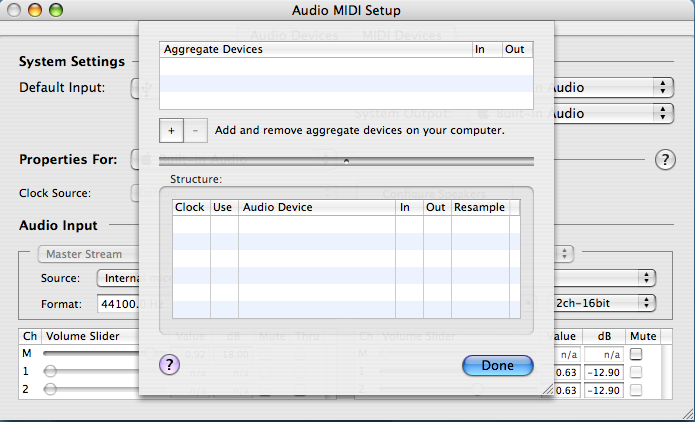
To get the audio-in and out of the VFX software working on the Mac, you need the in and out to be on the same device or sound card. You can do this by plugging in a USB sound card, or by making an 'Aggregate Device' that glues the hardware together. You can not mix your soundcards IO with soundflower 

You can create an 'Aggregate Device'
to glue the devices together by following the steps in this link.


If you are trying to use soundflower you need to create an 'Aggregate Device' for both directions, you can not mix your soundcard drivers and soundflower in the same 'Aggregate Device'. Once you have done this the audio should work once you select the 'Aggregate Device'  as the default input and output. Just creating an 'Aggregate Device' is not enough, it also needs to be set as the default device to use in the 'Audio Midi Setup' of the mac control panel.


For routing MIDI from another application into VFX you can use the IAC feature that is built into the MAC OS. Be sure to disable any MIDI drivers that send MIDI from the VFX software back to garage band as the resulting midi feedback will cause the software to crash.

By setting up IAC and soundflower you can use the VFX application like a Rewire application and use plugins that normally only run on a PC.
 

SM Pro Audio - VFX Help Desk Software: The following link from SM Pro Audio Support Center has a step by step guide and videos showing how to setup and use the VFX with another audio/midi software like Garage Band.

http://smproaudio.helpserve.com/index.php?_m=knowledgebase&_a=viewarticle&kbarticleid=57


Mac Topics That May Interest You:

How to install Magnus Choir on Mac    Is Magnus Choir available for Mac?

Magnus Choir Sampler+Library Audio Unit & VST for Mac  Magnus Choir NKI Kontakt Library

Magnus Choir Apple Logic EXS24 mkII Sample Library

Audio Units Modules (AU) In GarageBand   Installing A New AU In GarageBand


Using A New Audio Unit Instrument in GarageBand   GarageBand Aggregate Device


How To Use A New Audio Unit In GB    SoundFlower Configuration  


Adding Audio Units Modules (Instruments) to GarageBand (Step by Step)

VST & Audio Units Plug-ins in Mac OS X   SM Pro Audio VFX Software for Intel Mac OS X

How to setup Garage Band, Sound-flower, IAC, VFX     Apple's Boot Camp 

Microsoft Windows 7 and Apple Boot Camp Intel Mac v3.1 

OS X Mountain Lion and Boot Camp Software

IAC (Inter-Application Communication) Bus     Audacity VST Enabler

WACVST (Windows-Mac VST)     VSTAU Manager (VST to AU Adapter)

How To Use Soundflower      How to capture audio with Soundflower


Custom Search


Mac OS X is a trademark of Apple Inc.

Audio Units™ is a trademark of Apple Inc.

VST is a trademark of Steinberg Soft- und Hardware GmbH

Kontakt is a trademark of Native Instruments GmbH

Mac™ is a trademark of Apple Inc., registered in the U.S. and other countries.

EXS24™ and EXSP24 is a trademark of Apple Inc., registered in the U.S. and other countries


 Syntheway Virtual Musical Instruments © 2004-2013 Daniel Alberto Laiseca| Buenos Aires - Argentina|

Privacy Policy | Disclaimer | FAQ | Site Map Artists & Links Technical Support ContactAbout Us